
Steering wheel for PC (pro)1.86 - Get APK
You'll be able to download in few seconds.
Publisher Description
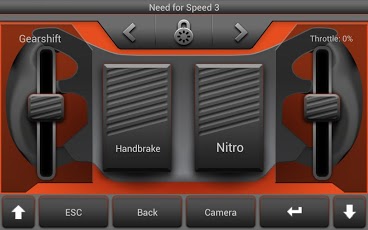
Control your racing game by turning the smartphone or tablet. Accelerate, brake, switch gears with simple gestures. Use assigned keys for special functions of your game.
Both DirectX games and online games as well as conventional PC games are supported.
The connection to your Microsoft Windows computer is done via WLAN/WiFi.
PC and Smartphone must be in the same WiFi network.
In order to use the app, a corresponding receive program has to be installed on your computer. On your PC, go to: www.dirtyhand.me to the page “first steps”.
http://www.dirtyhand.me/firststeps.html
For Instruktion look at this video:
https://www.youtube.com/watch?v=e65LzrRKsp8
Unlike with conventional hardware steering wheels, nothing has to be configured in the game itself. No driver is necessary.
New steering experience through duty cycle control!
We support the following games with predefined layouts at present:
- Need for Speed
- Richard Burns Ralley
- Formula 1
- GRID
- DIRT
- SPLIT
- BLUR
- TackMania & TackMania2
- Burnout
- FlatOut
- Crashday
- GTR
- rFactor
- Ski Challenge
If your game is not listed, please compare even if the layout of another game is suitable. The key assignment of each game can be looked up in the "manual Steering Wheel" on the homepage:
http://www.dirtyhand.me/manuals/SteeringWheelENU.pdf
There is an additional layout for online games that allows for the control of browser games as well.
The steering is done by turning the Android, O.K.
You have the option of accelerating and braking digitally by pressing the display with the right or left thumb.
Furthermore, there is the option of analog control by moving a controller with the right thumb.
If both the user and the game know how to switch gears manually, it is done by swiping up and down with the left thumb.
The view direction can be changed with special gestures.
Other special functions, e.g. hand brake, shooting, camera change, Nitro, etc., can be triggered by specially assigned keys.
Always test the volume keys of your smartphone. They have been set differently for each game, e.g. instructions of the copilot louder/softer, call for help after an accident, etc.
Note: The app supports the games as they are delivered from the manufacturers. The key assignment may not be changed. As input device you have to select "keyboard" (not "wheel" or "analog input device").
System requirements on the PC:
- Windows 98 / Me / XP/ Vista / 7 / 8 (32 / 64 Bit)
Keywords:
Racing Wheel
About Steering wheel for PC (pro)
The company that develops Steering wheel for PC (pro) is dirtyHand.me. The latest version released by its developer is 1.86.
To install Steering wheel for PC (pro) on your Android device, just click the green Continue To App button above to start the installation process. The app is listed on our website since 2013-08-13 and was downloaded 0 times. We have already checked if the download link is safe, however for your own protection we recommend that you scan the downloaded app with your antivirus. Your antivirus may detect the Steering wheel for PC (pro) as malware as malware if the download link to me.kyberback.steeringwheel is broken.
How to install Steering wheel for PC (pro) on your Android device:
- Click on the Continue To App button on our website. This will redirect you to Google Play.
- Once the Steering wheel for PC (pro) is shown in the Google Play listing of your Android device, you can start its download and installation. Tap on the Install button located below the search bar and to the right of the app icon.
- A pop-up window with the permissions required by Steering wheel for PC (pro) will be shown. Click on Accept to continue the process.
- Steering wheel for PC (pro) will be downloaded onto your device, displaying a progress. Once the download completes, the installation will start and you'll get a notification after the installation is finished.
Program Details
System requirements
Download information
Pricing
Version History
version 1.86
posted on 2013-08-13
- On some devices the steering direction is shifted by 90 degrees (one moves to the right, even though the steering wheel is held horizontally).,Under "Setting" there is now the option: "to correct 90 degrees to the right." Please select this option to remove the problem.,- The following games are now supported: Colin McRae Rally, WRC, GTR, rFactor, Need for Speed World, Unterground, The Run.,- New Design !!!
version 1.86
posted on 2013-06-12
Several fixes and updates
Disclaimer
External Download
We do not host Steering wheel for PC (pro) on our servers. We did not scan it for viruses, adware, spyware or other type of malware. This app is hosted by Galad and passed their terms and conditions to be listed there. We recommend caution when installing it.
The APK Download link for Steering wheel for PC (pro) is provided to you by apps112.com without any warranties, representations or guarantees of any kind, so access it at your own risk.
If you have questions regarding this particular app contact the publisher directly. For questions about the functionalities of apps112.com contact us.
